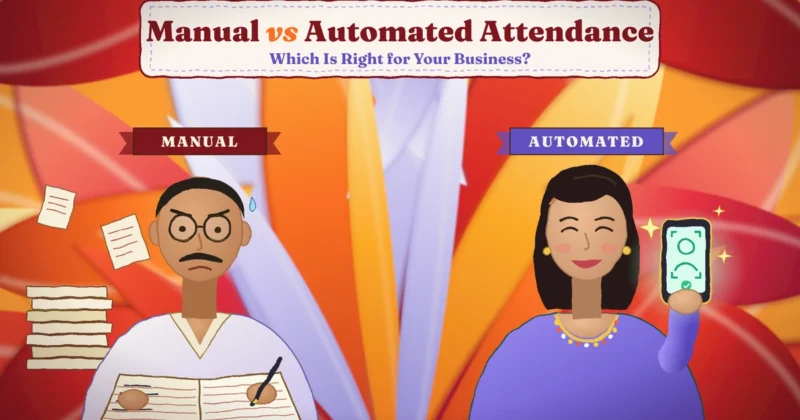
Ask three people in your office what time the team came in yesterday, and you may get three different answers. The register says one thing. The supervisor remembers another. The employee has a WhatsApp message that says something else. When salary day comes, all three versions end up on the HR desk, and someone has to decide which one is true.
This is what inaccurate attendance looks like in real life. It doesn’t feel like a big problem on any single day. But over a month, small gaps add up. A few missed punches, a few late marks that nobody recorded, and one or two proxy entries, and suddenly payroll is wrong, overtime is disputed and trust between staff and management starts to slip.
The good news is that accurate attendance isn’t hard to achieve. It needs clear rules, the right way to record time and a simple habit of checking the data before it reaches payroll. This guide walks you through all of it, step by step, in plain language.
Quick answer: To track employee attendance accurately, set clear attendance rules, use an automatic check-in method that confirms the person’s identity (such as biometric, face or QR code attendance), connect leave, holidays and shifts to the same system, make missed punch corrections simple and recorded, review attendance daily and close it every month before payroll. Train managers and employees so everyone follows the same process.
What Accurate Attendance Tracking Really Means
Many businesses think accurate attendance simply means “we know who came and who didn’t”. That’s only the start. A truly accurate attendance record answers several questions for every employee, every day.
- Who was present: the right person, not a friend punching in for them.
- When they came in and left: the actual in-time and out-time, not a rounded or guessed figure.
- How long they worked: total working hours, after breaks where your policy requires it.
- What kind of day it was: a working day, a weekly off, a holiday, approved leave or an unplanned absence.
- Where they worked: office, branch, client site or home, when that matters for your business.
- Whether it followed the rules: late arrival, early exit, half day or overtime, as defined in your policy.
An accurate record is also complete and timely. If half the data reaches HR three days late, or a branch sends its register only at month-end, the numbers can’t be trusted even if each entry is correct.
So accuracy has three parts: the data must be correct, it must be complete and it must be available when you need it. You can read more about building this kind of system in our attendance management guides.
Why Attendance Records Go Wrong
Before fixing anything, it helps to understand where errors come from. In most Indian workplaces, the same few problems show up again and again.
Manual entries and memory
Paper registers and Excel sheets depend on people writing the right time at the right moment. In practice, employees sign in a rush, supervisors fill gaps at the end of the day and some entries are written from memory. A 9:20 arrival easily becomes 9:00 on paper.
Proxy attendance
Also called buddy punching, this is when one employee marks attendance for another. It’s common with registers, ID cards and simple PIN systems. Even a few proxy entries a month can mean paying for hours that were never worked.
Forgotten or missed punches
People forget to punch out, a device is busy, or someone enters through another gate. Each missed punch creates a hole in the record. If there’s no clear way to fix it, HR ends up guessing.
Unclear rules
If your policy doesn’t say what counts as late, what a half day is or how night shifts are counted, two managers will treat the same situation differently. The data may be “accurate” but the result is still unfair.
Many sources of truth
Attendance in one system, leave approvals on WhatsApp, holidays in an email and shift rosters on a whiteboard. When these don’t connect, someone on approved leave can show up as absent, and a person on a weekly off can be marked missing.
Late updates
When branches or field teams send attendance only at month end, mistakes are discovered too late to correct properly. By then, nobody remembers what really happened on the 6th.
Device and network problems
Biometric devices that aren’t maintained, phones without location access or patchy internet can all cause missing or wrong entries if the system has no backup.
The good news is that every one of these problems has a simple fix. That’s what the rest of this guide covers.
Before vs Now: How Attendance Tracking Has Changed
Here’s a quick look at how attendance was tracked earlier compared with how accurate, modern tracking works today.
| Area | Before (manual way) | Now (accurate, automated way) |
|---|---|---|
| Recording time | Register or Excel, filled by hand | Automatic punch with exact time |
| Identity check | Signature or ID card, easy to fake | Fingerprint, face or QR linked to the person |
| Proxy attendance | Hard to catch | Very difficult because identity is checked |
| Missed punches | HR guesses or asks around | The employee raises a request, and the manager approves |
| Leave and holidays | Tracked separately, often on paper | Linked directly to the attendance record |
| Shifts and night duty | Calculated manually, often wrong | Shift rules applied automatically |
| Field and remote staff | Phone calls and trust | Mobile check-in with location and photo |
| Branch data | Sent at month-end | Visible the same day from anywhere |
| Payroll input | Retyped from registers | Exported directly from clean data |
| Disputes | Word against word | Clear record with time, place and approvals |
How to Track Employee Attendance Accurately Step by Step
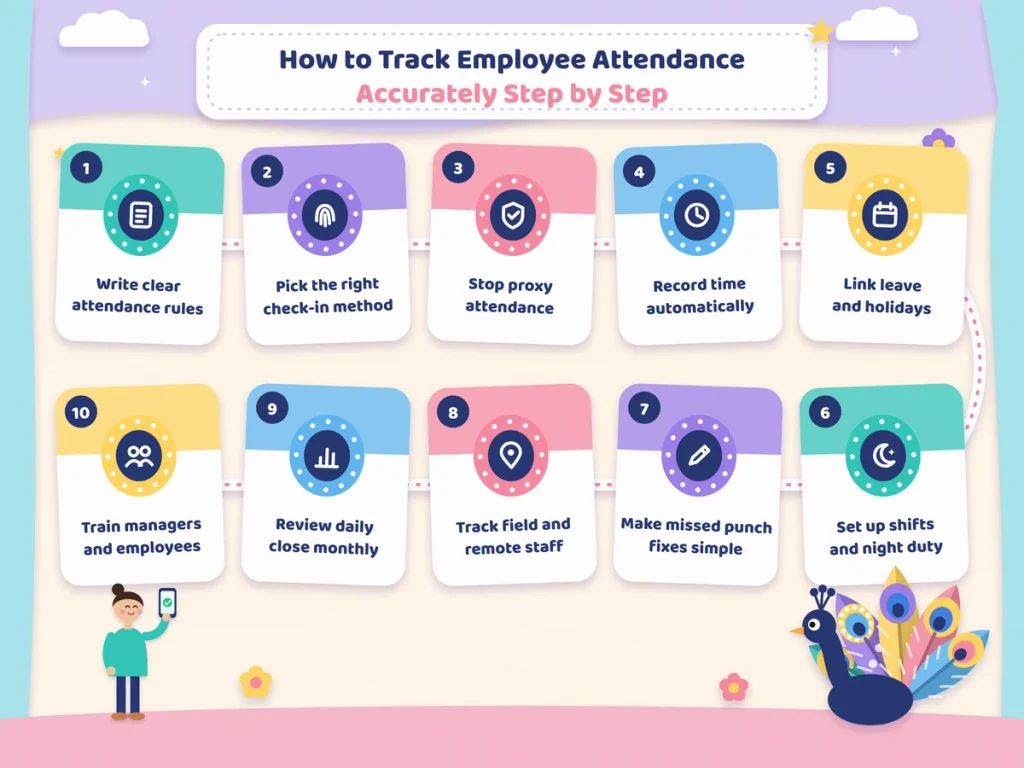
These ten steps work for small shops, factories, offices and multi-branch businesses. You don’t need to do everything on day one. Start with the first four, then add the rest.
1. Write down clear attendance rules
Accuracy starts with rules everyone understands. Put them in a short attendance policy and share it with every employee. Cover at least these points:
- Office timings and shift timings for each team.
- Grace time, and when an arrival counts as late.
- What counts as a half day and what counts as absent.
- How many late marks lead to a deduction, if any.
- How breaks are counted.
- How overtime is calculated and approved.
- How weekly offs, holidays and leave are handled.
- What an employee should do if they miss a punch.
When the rules are written, your system can apply them the same way to everyone. That alone removes many disputes.
2. Choose the right check-in method for each type of worker
There’s no single method that suits every employee. Match the method to how and where people work.
- Biometric fingerprint: good for factories, shops and offices with a fixed entry point. Quick and hard to fake.
- Face recognition: works well where hands are dirty, wet or gloved, and avoids touching a shared device.
- QR code attendance: low cost and simple. Employees scan a QR code at the location using their phone, which suits small offices, schools and sites.
- Mobile app with location: best for field sales, service technicians and delivery staff who rarely visit the office.
- Web check-in: useful for remote or work-from-home staff, ideally with a photo or IP check.
Many businesses use two or three of these together. Office staff use a fingerprint device, and the sales team checks in from the mobile app. What matters is that all of them feed into one system. If you’re considering devices, our biometric attendance section explains the options in more detail.
3. Stop proxy attendance at the source
Proxy entries are one of the biggest reasons attendance data goes wrong. The fix is to tie each punch to the actual person.
- Use fingerprint or face recognition instead of signatures or cards where possible.
- For mobile check-ins, ask for a selfie along with location.
- Use QR codes that change regularly so a photo of the code can’t be shared and reused.
- Limit check-ins to approved locations using a geofence, so nobody can mark attendance from home when they should be at the site.
You don’t need to treat employees as suspects. Most people are honest. These checks simply protect honest employees from being compared with the few who aren’t.
4. Record time automatically, not from memory
The moment a time is written by hand, accuracy drops. Let the device or app record the exact time of each punch. Avoid systems where supervisors type in times later, except through a proper correction process.
Automatic recording also saves a lot of work. HR no longer has to read handwriting, decode initials or type numbers from paper into Excel.
5. Connect leave, holidays and weekly offs to attendance
A record isn’t accurate if it shows someone as absent when they were on approved leave. Keep leave and holiday data in the same system as attendance.
- Employees apply for leave in the app, and the manager approves it there.
- Approved leave automatically appears on the attendance record for that day.
- Your holiday list, including state-specific and optional holidays, is set once and applied to everyone it covers.
- Weekly offs, including rotating offs for shift workers, are set in the roster so they’re never marked as absences.
This single step removes a huge share of month-end corrections.
6. Handle shifts and night duty properly
Shifts cause many attendance errors, especially night shifts that cross midnight. If a worker comes in at 10 pm on Monday and leaves at 6 am on Tuesday, a basic system may show two half days instead of one full shift.
To get this right:
- Create each shift in your system with its start time, end time and grace time.
- Assign shifts to employees through a roster, and update it when shifts change.
- Make sure night shifts are counted as one working day, linked to the date the shift started.
- Set rules for overtime, so hours beyond the shift are counted only when approved.
When shifts are set up correctly, late marks, early exits and overtime are calculated automatically and fairly.
7. Make missed punch corrections simple and traceable
No system is perfect. People will forget to punch out, or a device will have a bad day. What matters is how you correct it.
- Let employees raise a correction request from their phone, with a reason.
- Send the request to their manager for approval.
- Keep a record of who asked, who approved and when.
- Set a time limit, such as within three days, so corrections don’t pile up at month end.
- Watch for patterns. If one person misses punches every week, have a friendly conversation.
This keeps the record accurate without HR guessing, and it gives everyone a clear trail if questions come up later.
8. Track field and remote staff the right way
Field and remote employees are often where accuracy breaks down, because nobody can see them come in. Instead of relying on phone calls, use a mobile check-in with location and a photo at the start and end of the day.
For field teams that visit several places, you can also record visits during the day. For remote staff, a simple web or app check-in at login and logout works well. The goal isn’t to watch every minute. It’s to have a fair, consistent record that matches the rules you’ve set.
9. Review attendance daily and close it every month
Accurate tracking isn’t something you set up once and forget. A short daily check catches problems while they’re still easy to fix.
Every day (5 to 10 minutes):
- Check who is absent without leave.
- Look at missed punches and remind the people concerned.
- Approve pending correction requests.
Every month, before payroll:
- Make sure all corrections and leave requests are closed.
- Check overtime totals against approvals.
- Look at late marks and half days for anything unusual.
- Lock the month so nothing changes after payroll is processed.
Once the month is clean and locked, export it straight to payroll. This is where accurate attendance really pays off, because salary, overtime and deductions come from data everyone can trust. You can learn more about this link in our payroll and working hours section.
10. Train managers and employees
The best system still needs people who know how to use it. Spend a little time on training.
- Show employees how to punch in, apply for leave and request a correction.
- Show managers how to approve requests and read the daily report.
- Explain the attendance policy in simple words, in the language your team is most comfortable with.
- Share a one-page guide or a short video they can come back to.
When people understand the process, they follow it. When they don’t, they find workarounds, and workarounds are where errors come from.
How to Pick the Right Method for Your Workplace
If you’re unsure where to start, think about how your people work.
- Single office or shop with up to 50 staff: a fingerprint or face device at the entrance, plus a mobile app for anyone who travels, usually covers everything.
- Factory or warehouse with shifts: biometric or face devices at each gate, with shift rosters and overtime rules set up in the software.
- Multi-branch business: a device at every branch, all connected to one cloud system so HR sees every location in one place.
- Field sales or service teams: a mobile app with location and selfie check-in, and visit tracking if you need it.
- Schools, coaching centres and small offices: QR code attendance is quick to set up and costs very little.
- Remote or hybrid teams: app or web check-in, combined with clear rules on working hours.
Whatever you choose, keep it simple for employees. If marking attendance takes more than a few seconds, people will start skipping it.
Common Mistakes That Hurt Attendance Accuracy
Even with good tools, some habits quietly damage the data. Watch out for these.
- Allowing manual edits without approval. If anyone can change a time without a record, the data can’t be trusted.
- Ignoring missed punches until month end. By then, nobody remembers the real time.
- Running two systems side by side for too long. A short overlap during the switch is fine. Keeping a register “just in case” for months creates confusion about which record is correct.
- Not updating rosters. If shifts change but the roster doesn’t, late marks and absences will be wrong.
- Setting rules that nobody follows. If your policy says 5 minutes grace but managers allow 20, either change the rule or enforce it.
- Skipping device maintenance. Clean fingerprint sensors, check power backup and make sure devices sync regularly.
- Using attendance only for salary. Attendance data can show patterns like frequent Monday absences or one team always running late. Use it to fix problems early, not only to cut pay.
A Simple Attendance Accuracy Checklist

Use this short checklist to see where your business stands today.
- We have a written attendance policy that every employee has seen.
- Each punch is recorded automatically with the exact time.
- Our check-in method confirms the person’s identity.
- Leave, holidays and weekly offs are linked to attendance.
- Shifts and night duty are set up correctly in the system.
- Employees can request corrections, and managers approve them with a record.
- Field and remote staff have a fair way to check in.
- Someone reviews attendance every day.
- We close and lock attendance every month before payroll.
- Managers and employees know how to use the system.
If you can tick eight or more, your attendance is in good shape. If you tick fewer than five, start with the first four items. They make the biggest difference fastest.
Final Thoughts
Accurate attendance isn’t about catching people out. It’s about having one clear, fair record that everyone can rely on, so salary is right, overtime is paid properly and nobody has to argue about what happened three weeks ago.
Most errors come from a handful of causes: handwritten entries, proxy punches, missed punches without a proper fix, unclear rules and data scattered across registers, chats and spreadsheets. Fix those, and accuracy follows on its own.
Start small. Write your rules, choose a check-in method that suits how your team works, connect leave and shifts to the same system, and build a simple daily and monthly review habit. Within a couple of months, the three different answers about who came in yesterday become one answer, and it’s the right one.
Track Attendance Accurately with Attendi
Attendi is an attendance management system built for Indian businesses that want records they can trust. It supports biometric, face and QR code attendance, along with mobile check-in with location for field and remote staff. Leave, holidays, weekly offs and shift rosters sit in the same place, so every day is marked correctly. Employees can raise missed punch requests from their phone, managers approve them in a tap, and HR gets clean monthly reports ready for payroll. If you want attendance that’s accurate without extra paperwork, explore Attendi and see how it fits your team.
Frequently Asked Questions
What is the most accurate way to track employee attendance?
The most accurate way is an automatic system that records the exact time of each punch and confirms the person’s identity, such as fingerprint, face recognition or QR code with a selfie, combined with linked leave, holiday and shift data.
How can I stop proxy attendance?
Use identity-based methods like biometric or face recognition, add a selfie and location for mobile check-ins, use QR codes that change regularly and limit check-ins to approved locations.
What should I do when an employee forgets to punch?
Let the employee raise a correction request with a reason, have their manager approve it and keep a record of the change. Set a short time limit for these requests so they don’t pile up at month end.
How do I track attendance for field staff accurately?
Use a mobile app that records check-in and check-out with location and a photo. For staff who visit several places in a day, add visit tracking so you can see their working day clearly.
Is Excel good enough for attendance tracking?
Excel can work for a very small team, but it depends on manual entry, which leads to errors and makes proxy attendance hard to spot. As your team grows, an automated attendance system is far more reliable.
How often should attendance be reviewed?
A quick daily check of absences, missed punches and pending requests works best, followed by a full review and lock at the end of every month before payroll is processed.
Can attendance software handle night shifts?
Yes. Good attendance software lets you set shifts that cross midnight and counts them as one working day, so night workers aren’t wrongly shown as having two half days.