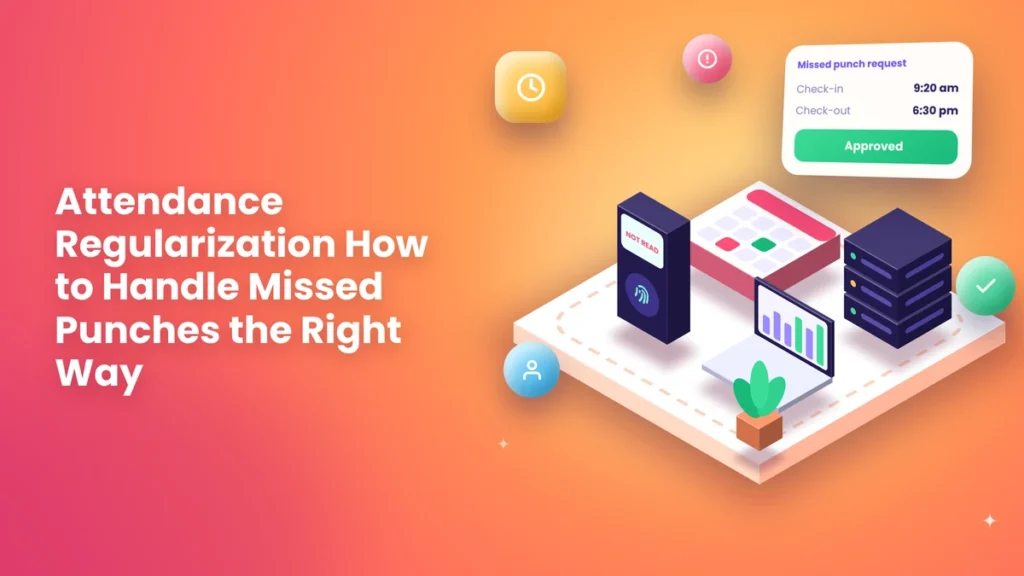
Priya works in accounts at a logistics company in Chennai. On Tuesday, she reached the office at 9:20, but the fingerprint machine wouldn’t read her finger after she’d been carrying wet groceries. She tried four times, gave up, and went to her desk. At 6:30 pm, she left in a hurry for a school meeting and forgot to punch out.
At month end, Tuesday shows up in her attendance as “absent.” Her salary is short by a day. She’s upset; her manager is caught in the middle, and HR has to dig through emails and CCTV to sort it out.
This happens in almost every company that uses an attendance system, big or small. Machines fail to read a finger, phones die, people forget to punch, someone attends a client meeting straight from home, and the internet goes down. The attendance record ends up wrong, even though the person was working.
The fix is attendance regularization: a simple, fair process to correct genuine attendance gaps. This guide explains what it is, when it should be used, how to set up a clear process, and how to stop it from being misused.
Short answer: Attendance regularization is the process of correcting an employee’s attendance record when a punch is missing or wrong for a genuine reason, such as a forgotten punch, a device problem, a client visit, or official travel. The employee raises a request in the attendance system with a reason, the manager approves or rejects it, and the record is updated with a clear log. Set limits, deadlines, and approval rules in your attendance policy so the process stays fair and isn’t misused.
What Is Attendance Regularization?
Attendance regularization means fixing an attendance record that doesn’t match reality. It’s used when an employee was actually working, but the system shows them as absent, late, half-day, or with a missing punch.
Common examples:
- An employee forgot to punch in or punch out
- The biometric device didn’t read their fingerprint
- They attended a client meeting or site visit before coming to the office
- They were on official travel or training
- The device or app wasn’t working
- The internet was down, and the punch didn’t sync
Regularization doesn’t change the rules. It simply corrects the record so the rules are applied to what actually happened. You may also hear it called “attendance correction,” “missed punch request,” or “attendance adjustment.” They all mean the same thing. For a broader look at managing attendance properly, explore our attendance management guides.
Regularization vs. Leave: What’s the Difference?
This is where many people get confused.
- Regularization is for days when the employee was working, but the record is wrong or incomplete.
- Leave is for days when the employee wasn’t working, such as sick leave, casual leave, or personal time off.
If someone stayed home because they were unwell, that’s leave, not regularization. If someone was at a client’s office all day, that’s regularization, because they were working. Keeping this difference clear is the key to a fair process. Our guides on leave and holiday management explain how leave should be handled separately.
Before vs. Now: Fixing Attendance Errors
Here’s what changes when a business moves from informal fixes to a proper regularization process.
| What you look at | Before (informal fixes) | Now (clear regularization process) |
|---|---|---|
| Missed punch | Discovered at month-end | Request raised within a day or two |
| How it’s fixed | Email, call, or word with HR | Request in the attendance app with a reason |
| Approval | Whoever HR can reach | The reporting manager approves or rejects |
| Proof | Often none | Reason and attachment, if needed |
| Record of changes | Edits made quietly in a sheet | Every change logged with name and time |
| Deadline | None; requests come weeks later. | Clear deadline, such as 3 days |
| Limits | No limit, easy to misuse | Set the number of requests per month |
| Salary impact | Corrected after salary, or never | Fixed before payroll runs |
| Employee experience | Frustrating and unfair | Quick and simple |
| Trust in records | Low | High |
A clear process protects honest employees and stops the system from being misused. It also saves HR from chasing emails and phone calls at the busiest time of the month.
When Should Regularization Be Allowed?
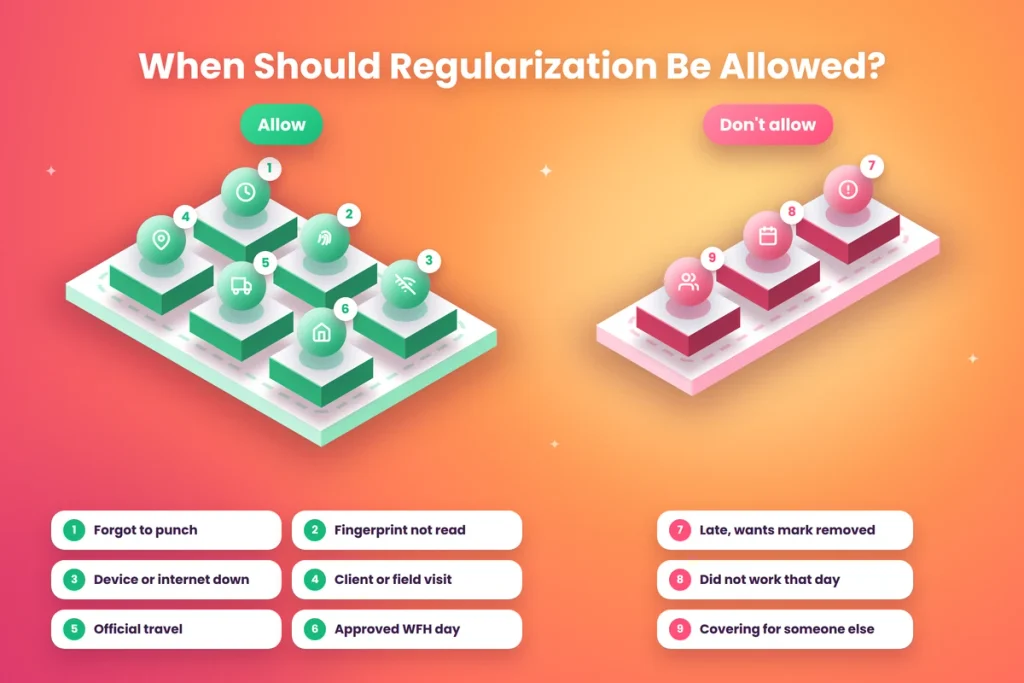
Regularization should be allowed for genuine situations where the employee was working. Typical valid reasons include:
- Forgot to punch in or out: occasional, not a habit
- Device not working: power cut, machine fault, or app error
- Fingerprint or face not recognized: after several attempts
- Client visit or field work: started or ended the day outside the office
- Official travel: working from another city or site
- Training or events: attending an approved session away from the office
- Work from home: approved WFH day without a check-in
- Internet or sync failure: punch made but not recorded
Regularization should not be used for:
- Coming late and wanting the late mark removed without a valid reason
- Days when the employee didn’t work at all
- Covering for someone else’s absence
How to Set Up a Regularization Process
Step 1: Write It into Your Attendance Policy
Add a short section that explains:
- What regularization is for
- Valid reasons for a request
- How many requests are allowed per month
- The deadline to raise a request
- Who approves it
- What happens if a request is rejected
Step 2: Set a Monthly Limit
A common limit is two to four regularization requests per month. This covers genuine mistakes without allowing misuse. Requests for official travel or client visits can be handled separately if they’re frequent in someone’s role.
Step 3: Set a Deadline
Ask employees to raise a request within two or three working days of the missed punch. Requests raised weeks later are hard to verify and delay payroll.
Step 4: Decide Who Approves
Usually the reporting manager approves because they know whether the person was actually working. For larger or repeated requests, HR can review as well.
Step 5: Ask for a Clear Reason
Every request should have a short reason, such as “Client meeting at Andheri, 9 to 11 am” or “Machine didn’t read fingerprint; tried 4 times.” For travel or events, an attachment like a ticket or invitation can be added.
Step 6: Use the Attendance System, Not Email
Requests should be raised and approved inside the attendance app. This keeps a clean record and updates attendance automatically once approved.
Step 7: Lock Records Before Payroll
Set a cut-off date each month, after which regularization requests are closed and attendance is finalized for payroll.
Sample Regularization Policy
Here’s a short policy you can adapt:
Attendance Regularization Policy
Purpose: To correct attendance records when an employee was working but their attendance was not recorded correctly.
Valid reasons: forgotten punch, device or app failure, fingerprint not recognized, client visit, field work, official travel, training, or approved work from home.
How to apply: Raise a regularization request in the attendance app with the date, correct timings, and reason.
Deadline: Within 3 working days of the date to be corrected.
Limit: Up to 3 requests per month for forgotten punches or device issues. Official travel and client visits are not counted in this limit.
Approval: Requests are approved or rejected by the reporting manager. HR may review frequent requests.
Cut-off: All requests for a month must be raised and approved by the 26th, after which attendance is finalized for payroll.
Misuse: False requests will be treated as a disciplinary matter.
Reducing the Need for Regularization
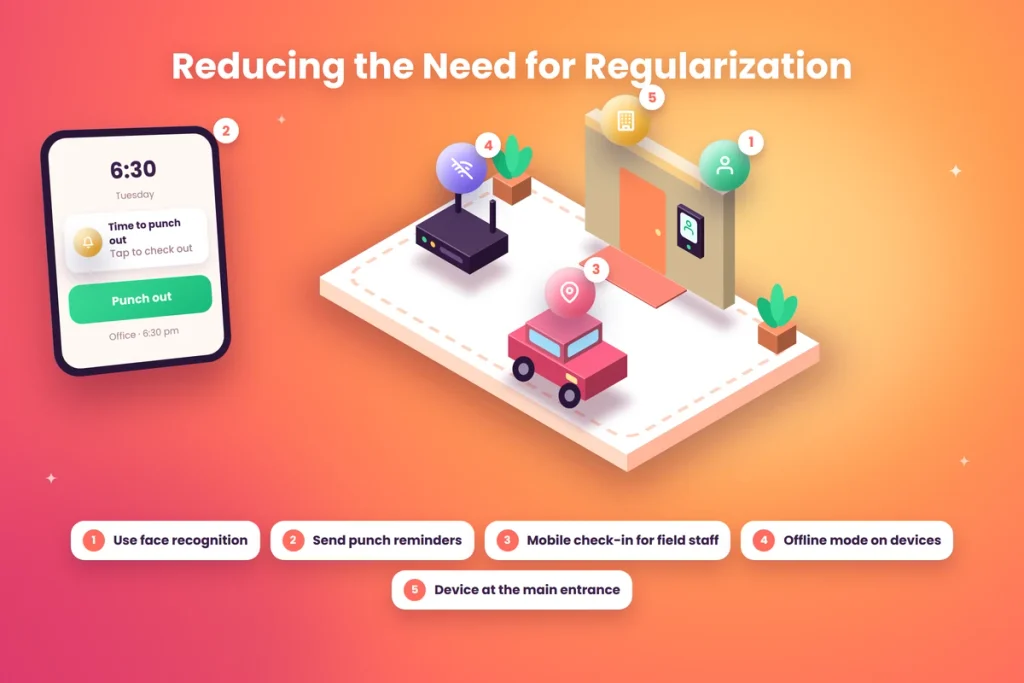
The best regularization process is one that’s rarely needed. These steps reduce missed punches in the first place:
Fix Device Problems
If many people have trouble with fingerprints, consider face recognition, which works better for people whose fingerprints wear down from manual work. Clean the scanner regularly and place it away from direct sunlight. Our guides on biometric attendance explain how to choose and maintain devices.
Send Reminders
Many apps can send a reminder if someone hasn’t checked in or out by a certain time. A simple evening reminder alone can cut forgotten punch-outs sharply.
Give Field Staff a Mobile Option
Instead of asking field staff to regularize every client visit, let them check in on a mobile app with location.
Use Offline Mode.
Devices and apps that store punches offline avoid gaps caused by internet problems.
Keep Devices Where People Pass
A device in a corner gets forgotten. Place it at the main entrance, where everyone passes in and out, at a comfortable height.
How to Stop Misuse of Regularization
Regularization is meant to fix honest mistakes, but without rules it can become a way to erase late marks or absences. Prevent this with:
- Monthly limits on requests
- Short deadlines so requests are raised while details are fresh
- Manager approval by someone who knows the employee’s work
- Clear reasons for every request
- A full change log showing who requested, who approved, and when
- Monthly review of employees and teams with frequent requests
- Consequences written in the policy for false requests
When someone raises requests every week, it’s usually a sign of a deeper issue, such as a habit of forgetting, a device problem at their location or lateness being covered up. A quick conversation helps find out which.
What Managers Should Check Before Approving
Before approving a regularization request, a manager should ask:
- Was this person actually working at that time?
- Does the reason make sense for their role?
- Is this a one-time issue or a pattern?
- Is the request within the deadline and monthly limit?
- Does the time requested look reasonable?
If the answer to the first question is no, the request should be rejected, and the day should be treated as leave or absence according to the policy.
Real-Life Examples: Approve or Reject?
Here are some everyday situations and how a fair process would handle them.
Example 1: Forgot to punch out. An employee worked a full day but forgot to punch out. The manager saw them in the office until 6:30 pm. Approve. This is exactly what regularization is for.
Example 2: Client meeting in the morning. A sales manager went straight to a client meeting at 9 am and reached the office at 12. Approve, as this was work. If it happens often, consider letting them check in on a mobile app instead.
Example 3: Late because of traffic. An employee reached at 10:15 because of a traffic jam and wants the late mark removed. Reject. Lateness is handled by the late coming policy, not regularization, unless there was a special situation like a city-wide flood that the company has relaxed rules for.
Example 4: Unwell and stayed home. An employee was ill and didn’t come in, but wants the day regularized. Reject the regularization, and ask them to apply for sick leave instead.
Example 5: Machine was down. The biometric device wasn’t working for the whole morning, and nobody’s punches were recorded. Approve for everyone affected, ideally in one go by HR, with a note about the device failure.
Example 6: Fifth request this month. An employee raises their fifth “forgot to punch” request in a month. Check the policy limit, and have a conversation to understand why it keeps happening.
How Regularization Affects Payroll
Every approved request changes the attendance data that payroll uses. A missed punch that turns a full day into an absence can mean a full day’s salary is wrongly deducted. That’s why timing matters.
Set a monthly cut-off date for requests, a few days before payroll is processed. After that, attendance is locked and sent for salary calculation. Any genuine correction found after the cut-off should be adjusted in the next month’s salary, with a clear note, rather than quietly editing old records.
Common Mistakes to Avoid
- No written process. Every case becomes a negotiation.
- No limits or deadlines. Requests pile up and are hard to check.
- HR editing records directly. Changes should go through requests and approvals with a log.
- Approving everything without checking. It turns regularization into a loophole.
- Rejecting genuine requests. It punishes honest employees for machine problems.
- Mixing regularization with leave. Days not worked should be leave, not regularization.
- Fixing errors after salary is paid. Corrections should happen before payroll.
Final Thoughts
Remember Priya, marked absent on a day she worked a full shift? With a proper regularization process, she would have raised a request the next morning: “Fingerprint not read at 9:20 am, forgot to punch out at 6:30 pm.” Her manager, who saw her at her desk all day, would have approved it in a minute, and her attendance would have been corrected long before payroll.
That’s the purpose of attendance regularization: to make sure honest employees aren’t penalised for machine errors, forgetfulness or work outside the office. Write it into your policy, set sensible limits and deadlines, keep every request inside the attendance system and review patterns regularly. Done right, it builds trust in your attendance records instead of weakening it.
Handle Missed Punches Easily with Attendi
Attendi is a simple attendance management system built for Indian businesses. Employees can raise missed punch and regularization requests in the app, managers can approve them in one tap, and every change is recorded. Along with biometric and QR code attendance, leave and holiday management and payroll-ready reports, Attendi keeps your attendance accurate without endless emails and corrections. Explore more guides on our website or get in touch through our contact page.
Frequently Asked Questions
What is attendance regularization?
It’s the process of correcting an employee’s attendance record when a punch is missing or wrong for a genuine reason, such as a forgotten punch, a device problem or work outside the office.
What is the difference between regularization and leave?
Regularization is used when the employee was working but the record is wrong. Leave is used when the employee wasn’t working.
How many regularization requests should be allowed in a month?
Many businesses allow two to four requests a month for forgotten punches or device issues. Official travel and client visits can be handled separately.
Who should approve attendance regularization?
Usually the reporting manager, because they know whether the employee was actually working. HR can review frequent or unusual requests.
Can regularization be misused?
Yes, if there are no limits, deadlines or checks. Set monthly limits, require clear reasons, use manager approval and keep a log of every change.
What happens if a regularization request is rejected?
The original attendance record stays as it is. If the employee wasn’t working, the day is treated as leave or absence according to the policy. The employee should be told the reason for rejection.
Can HR regularize attendance for many employees at once?
Yes. When a device fails or the internet goes down for everyone, HR can correct attendance for all affected employees in one step, with a note explaining the reason.
What is a missed punch?
A missed punch is when an employee doesn’t record their check-in or check-out, so thei