An attendance management system is a tool that tracks the time employees spend at work. At its simplest, it answers three questions for every person, every day:
- Did they come to work?
- When did they start and finish?
- Were they on leave, late, on a half day, or working overtime?
Older methods, such as a paper register or a punch card machine, only capture the first part. Someone still has to count hours, check leave, and work out salary deductions by hand.
A modern system goes further. It collects the punch-in and punch-out times, applies your company’s rules (shift timings, grace time, weekly offs, holidays, and leave policy), and gives you a clean monthly report. Most systems can send that report straight to your payroll software, so salaries are worked out from real attendance, not guesses.
You will also hear it called a time and attendance system, attendance software, an employee attendance tracker or a biometric attendance system. The names differ, but the job is the same.
How an Attendance Management System Works
Most systems follow the same five steps, whatever device they use.
1. The employee marks attendance. They place a finger on a scanner, look at a face recognition device, tap an ID card, scan a QR code, or press a button in a mobile app. This creates a time-stamped record.
2. The record reaches the software. The device or app sends the punch to the attendance software, either in real time over the internet or in batches if the connection drops.
3. The software applies your rules. It compares the punch time with the employee’s shift. If the shift starts at 9:30 with 10 minutes’ grace, a 9:45 punch is marked late. If someone works past their shift, the extra time is counted as overtime.
4. Leave and exceptions are matched. Approved leave, holidays, weekly offs, and work-from-home days are added. If someone forgot to punch, they can raise a request, and their manager approves or rejects it in the app.
5. Reports and payroll are updated. At month end, the system shows days present, absent, late marks, leave taken and overtime hours for each person. This goes to payroll, and salary slips reflect actual attendance.
The owner or HR manager can see all of this on one screen, often on their phone, without asking anyone.
Types of Attendance Management Systems
There is no single best type. The right choice depends on where your people work, how many there are and how much you want to spend.
Manual Register or Excel Sheet
Employees sign a register, or a supervisor fills an Excel sheet.
- Good for: very small teams of under 10 people in one location.
- Problems: easy to fake, easy to lose, and every calculation is done by hand. Mistakes show up in salaries and cause arguments.
Fingerprint Biometric System
A wall-mounted scanner reads each employee’s fingerprint.
- Good for: offices, shops, and factories where everyone comes to one location.
- Problems: fingerprints of workers who do heavy manual work, use chemicals, or are older can be hard to read. Shared touch surfaces also raise hygiene concerns.
Face Recognition System
A device or tablet recognizes each employee’s face. Many models also check body temperature or work with masks.
- Good for: busy entry points, factories, and offices that want a touch-free option.
- Problems: costs more than a fingerprint scanner, and poor lighting can slow it down.
RFID or ID Card System
Employees tap a card on a reader at the gate or door.
- Good for: companies that already use cards for door access.
- Problems: one employee can tap another’s card. This is called buddy punching, and cards get lost or forgotten.
Mobile App with GPS and Geo-Fencing

Employees mark attendance on their phones. GPS confirms where they are, and geo-fencing only allows a punch inside a set area, such as the office or a client site. Many apps also ask for a selfie at the time of punching.
- Good for: field sales staff, service technicians, delivery teams, construction sites, and companies with several small branches.
- Problems: needs employees to have smartphones with location turned on, and some staff may worry about being tracked.
QR Code System
A QR code is displayed at the location, and employees scan it with the company app to punch in.
- Good for: small offices, events, training centers, and temporary sites.
- Problems: a printed QR code can be photographed and scanned from elsewhere, unless the code changes every few seconds or is combined with GPS.
Web or Computer Login
Employees mark attendance when they log in to a web portal or their work computer.
- Good for: IT companies, remote teams, and back-office staff.
- Problems: it shows login time, not the time someone actually started working.
Many growing businesses use a mix. For example, a face recognition device at the factory gate and a mobile app with geo-fencing for the sales team, both feeding into one system.
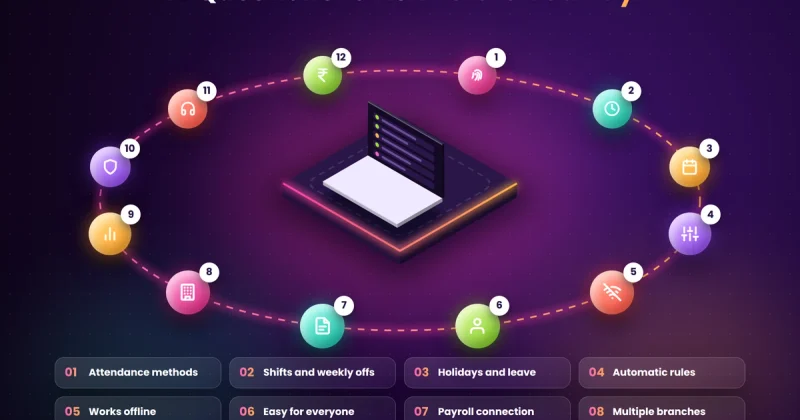
Key Features to Look For
Not every business needs every feature. Here are the ones that make the biggest difference day to day.
- Shift and roster management: handles general, rotating, night, and split shifts, with grace time and weekly offs set per team.
- Leave management: employees apply for leave in the app, managers approve it, and balances update on their own.
- Overtime calculation: counts extra hours based on your rules, so overtime pay is correct and on record.
- Missed punch and regularization requests: let employees correct a forgotten punch with a manager’s approval, instead of a quiet edit in a register.
- Payroll integration: sends attendance data directly to payroll software, or to Tally, so salary calculation starts from accurate numbers.
- Mobile app: lets employees see their attendance and leave, and lets managers approve requests from anywhere.
- Real-time dashboard: shows who is in, who is late, and who is absent right now, across all locations.
- Reports and export: monthly muster rolls, late-coming reports, and overtime reports that you can download for audits or inspections.
- Multi-location support: manages several branches, sites, or factories from one account.
- Offline mode: keeps recording punches when the internet is down and syncs them later.
- Alerts: sends a message when someone is late, absent without leave, or misses a punch.
- Data security and access control: decides who can see or edit attendance data and keeps a record of every change.
Benefits of an Attendance Management System
For the Business Owner
- Accurate salaries: you pay for the time people actually worked. Over a year, removing even small errors and fake entries adds up.
- Less time on paperwork: HR no longer spends days at month-end matching registers with leave forms.
- A clear view of the business: you can see patterns, such as one branch with frequent late marks or one team with high overtime, and act on them.
- Records ready for inspections: if a labor inspector or auditor asks for attendance and overtime records, you can produce them in minutes.
For HR and Managers
- No more chasing: leave requests, missed punches, and approvals happen inside the app.
- Fewer disputes: when an employee questions a salary deduction, the punch record settles it.
- Easier shift planning: managers can see who is available and plan rosters without guesswork.
For Employees
- Transparency: they can check their own attendance, leave balance, and overtime at any time.
- Fair treatment: everyone follows the same rules, and nobody can mark attendance for a friend.
- Faster requests: leave and corrections are approved in hours, not days.
Signs Your Business Needs One
If any of these sound familiar, a paper register or Excel sheet is already costing you more than an attendance system would:
- Salary calculation takes more than a day or two every month.
- Employees often dispute deductions or overtime pay.
- You suspect people mark attendance for each other.
- You have staff in more than one location or working in the field.
- Leave is tracked on WhatsApp, email, and paper at the same time.
- You run shifts, night work, or regular overtime.
- You can’t quickly show attendance records if someone asks for them.
Attendance Rules Indian Employers Should Know
Attendance is not only about discipline. It is also a legal record. Here are the basics every Indian employer should keep in mind.
The New Labour Codes
India’s four labor codes came into effect on 21 November 2025, replacing 29 older labor laws. They set a limit of eight hours of work a day for workers in establishments covered by the codes, and overtime must be paid at twice the regular wage rate. Employers must also keep prescribed registers and records, which include attendance, working hours, overtime, and wages.
The detailed rules, including register formats, are set by the central and state governments and were still being rolled out across states in 2026. An attendance system that records exact working hours and overtime makes it much easier to follow these rules and to show proof when asked. Check the exact requirements for your state with your CA or labor law consultant.
Biometric Data and the DPDP Act
Fingerprints and face scans are personal data. Under the Digital Personal Data Protection (DPDP) Act, 2023, employers may process employee data for employment purposes, but they must still keep it safe, use it only for the stated purpose and delete it when it is no longer needed. Most of the Act’s duties become enforceable on 13 May 2027.
In practice, this means:
- Tell employees clearly, in writing, what data you collect and why.
- Get written consent for biometrics, which many lawyers recommend as a safe practice.
- Use the data only for attendance and security, not for anything else.
- Choose a system that encrypts biometric data and limits who can access it.
- Delete an employee’s biometric data within a reasonable time after they leave.
- Offer another way to mark attendance to anyone who can’t or won’t use biometrics.
How Much Does an Attendance Management System Cost in India?

Costs come in two parts: the software and, if you need it, the hardware.
Software: Most cloud-based attendance software in India charges per employee per month. Prices usually range from about ₹25 to ₹180 per employee per month, depending on features. Many providers also sell plans for a fixed number of employees, starting at roughly ₹2,500 a month for 50 employees and going up for larger teams or full HR and payroll suites. Some offer free plans for very small teams.
Hardware: A basic fingerprint scanner usually costs a few thousand rupees. Face recognition devices cost more, and higher-end models with temperature checks or access control cost more again. Mobile app and QR code systems need no special hardware, as employees use their own phones.
Other costs to plan for:
- Installation and setup
- Moving employee and leave data from your old records
- Training for HR, managers and staff
- Internet connection at each location
- Yearly renewal or support charges
- 18% GST on software and devices
As a rough guide, a 50-person business using a cloud system with one biometric device can often get started for under ₹10,000 a month in software, plus a one-time hardware cost. Always ask vendors for the full first-year cost in writing, including setup and GST.
How to Choose the Right Attendance System
Before you buy, get clear answers to these questions:
- Where do your people work? One office, several branches, factory floors or out in the field? This decides whether you need devices, a mobile app or both.
- How do your shifts work? Make sure the system handles your exact shift patterns, grace time, weekly offs and overtime rules.
- Does it connect to your payroll? If you use Tally, Zoho Payroll or another tool, check that attendance data moves across without retyping.
- Does it work offline? If the internet at a site is unreliable, punches must still be saved.
- Is it easy for every employee? A worker on the shop floor should be able to use it without training. Check if the app supports Hindi or your regional language.
- How is data protected? Ask where data is stored, whether biometrics are encrypted and who can edit records.
- What does support look like? Check whether support is available in Indian working hours, by phone or WhatsApp.
- What happens as you grow? Ask what the price will be when your team doubles, and whether adding a new branch is simple.
- Can you take your data with you? Make sure you can export all attendance records if you change providers.
Ask for a free trial and test it with one team for two weeks, using real shifts and real people, before you sign up for everyone.
Ready-Made Software or a Custom System?
For most small and mid-sized businesses, ready-made attendance software is the quickest and cheapest way to start. You sign up, connect a device or app, set your rules and go live within days.
A custom-built system makes more sense when:
- Your shift, overtime or incentive rules are unusual and ready-made tools can’t handle them.
- You need attendance linked closely with other systems, such as production tracking, job cards, site billing or your own ERP.
- You have many locations or contract workers and want one dashboard for everything.
- You want full control over where employee data is stored.
- Per-employee fees on a large team are adding up to more than a one-time build would cost.
A middle path also works well. Many businesses use ready-made software and add custom automation on top, such as sending daily attendance summaries to managers on WhatsApp, or pushing monthly data straight into their accounting system.
How to Roll Out an Attendance System Smoothly
Buying the system is the easy part. Getting everyone to use it properly takes a little planning.
- Write down your rules first. Agree on shift timings, grace time, late-mark rules, half-day rules and overtime before you set anything up.
- Tell employees what is changing and why. Explain that the goal is accurate, fair salaries, not watching them. Share how their data will be used and protected.
- Start with one team or branch. Fix problems there before rolling out across the company.
- Run old and new side by side for two weeks only. Compare results, fix gaps, then stop the paper register on a fixed date.
- Train managers on approvals. If managers don’t approve leave and corrections on time, employees lose trust in the system.
- Check the first month’s payroll carefully. Compare a few salaries by hand to make sure every rule works as expected.
Common Mistakes to Avoid
- Choosing a device before checking where people work. A fingerprint scanner is no help for a field sales team.
- Skipping the rules setup. If grace time or overtime rules are wrong, every salary will be wrong too.
- Keeping the register “just in case”. Running two systems for months means nobody trusts either.
- Ignoring data privacy. Collecting fingerprints or faces without telling employees how the data is used can cause legal and trust problems.
- Not planning for internet outages. A system without offline mode can lose a full day of punches.
- Using attendance only to punish. Use the data to spot problems, like a shift that always runs late, not only to cut salaries.
Final Thoughts
An attendance management system does a simple job: it records who worked, when and for how long. But getting that one thing right fixes a lot. Salaries become accurate, month-end stops being stressful, disputes drop and you have proper records if anyone asks.
You don’t need the most expensive system. Start by looking at where your people work and how your shifts run, then pick the type that fits. A small office may only need a mobile app, while a factory may need a face recognition device at the gate.
Try it with one team first, set your rules carefully and give your staff a clear reason for the change. Within a couple of months, you will wonder how you managed with a register.
Need Help Setting One Up?
Nexify builds custom software and business automation for companies across India. Whether you need help choosing and setting up attendance software, connecting it to your payroll or accounting system, or a fully custom attendance tool built around how your business works, we can help with a clear plan and a fixed price in writing. Reach us through our contact page or on WhatsApp.
Frequently Asked Questions
What is an attendance management system in simple words?
It is a system that records when employees start and finish work, and then works out their attendance, leave, late marks and overtime on its own. It replaces paper registers and Excel sheets and sends the data to payroll.
Which attendance system is best for a small business?
For a small office in one location, a mobile app with geo-fencing or a basic fingerprint scanner with cloud software is usually enough. If your staff work in the field or across sites, choose a mobile app with GPS and selfie punch.
Is biometric attendance legal in India?
Yes, employers can use biometric attendance. But fingerprints and face data are personal data under the DPDP Act, 2023, so employers should tell employees how the data is used, keep it secure, use it only for attendance and security, and delete it when it is no longer needed.
Can an attendance system work without the internet?
Many systems can. Biometric devices and good mobile apps store punches offline and sync them once the connection returns. Check for offline mode before you buy if any of your locations have poor internet.
Can attendance software connect with Tally or payroll software?
Yes, most attendance software can export data to payroll tools, and many connect directly with Tally, Zoho Payroll and other popular systems. If yours doesn’t, a custom integration can move the data across automatically.
How long does it take to set up an attendance management system?
A cloud-based system with a mobile app can go live within a few days. Adding biometric devices, multiple locations and payroll integration usually takes two to four weeks, including testing.