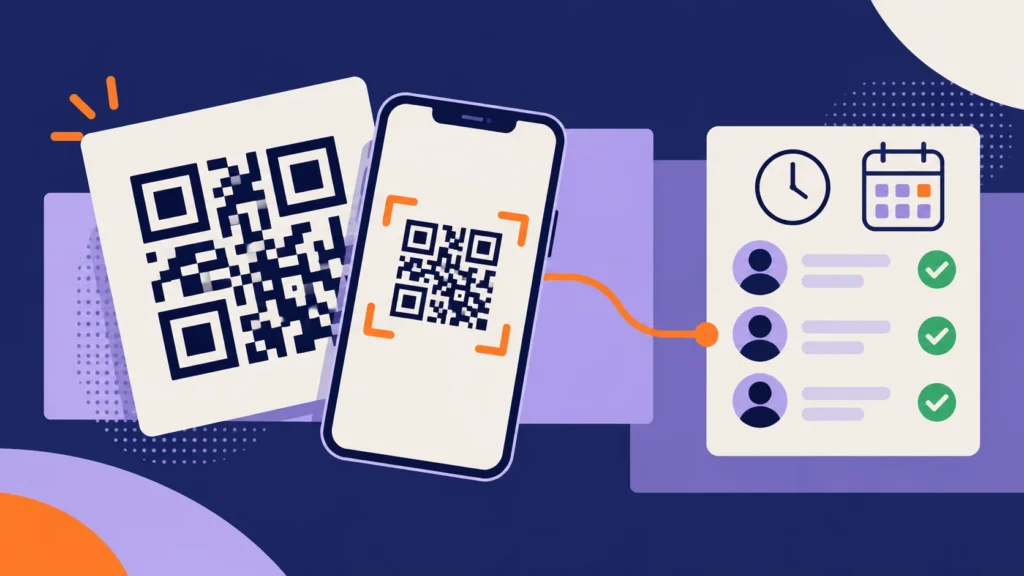
Picture a coaching center with 12 staff members. There are teachers, two office assistants, a receptionist, and a cleaner. Attendance is a register on the front desk. Some days it gets signed, some days it doesn’t. When a teacher says she came at 9 but the register is blank, nobody can prove anything either way.
The owner looks at biometric machines, sees the price, and decides it’s too much for a team this size. Then someone suggests QR code attendance. No expensive machine, no complicated setup, just a code on the wall and an app on each phone.
If you run a small team like this, QR code attendance might be exactly what you need. This guide explains how it works in plain words, how to set it up step by step, and how to make sure nobody misuses it.
Short answer: In QR code attendance, a QR code is placed at your workplace, printed, or on a screen. Employees scan it with an attendance app on their phone when they arrive and leave. The app saves the exact time, checks the location, and sends the record to your attendance software, which marks late arrivals, absences, and working hours automatically. It’s one of the cheapest and quickest ways for a small team to stop using a paper register.
What Is QR Code Attendance?
You already know QR codes. You scan them to pay with UPI, open a restaurant menu, or join a Wi-Fi network. QR code attendance uses the same idea to mark attendance.
A QR code is placed at your office, shop, or center. When employees arrive, they open the company’s attendance app and scan it. The app knows who is scanning, because each person logs in with their own account. So one scan tells the system three things:
- Who marked attendance
- When they did it
- Where they were
That record goes straight into your attendance software. No register, no handwriting, no arguments. You can find more guides on this method in our QR code attendance section.
Before vs Now: Paper Register vs QR Code Attendance
Here’s what changes when a small team switches from a register to QR code attendance.
| What you look at | Before (paper register) | Now (QR code attendance) |
|---|---|---|
| Marking attendance | Signing a register at the desk | Scanning a QR code with a phone |
| Time recorded | Written by hand, often guessed or rounded | Exact time saved automatically |
| Proxy attendance | A colleague can sign for you. | Location and selfie checks stop it. |
| Cost | Cheap but full of hidden mistakes | Very low, no special machine needed |
| Setup time | None, but no real control either. | A few hours on day one |
| Late arrivals | Rarely noticed or tracked | Marked automatically with grace time |
| Leave | Told verbally or on WhatsApp | Applied and approved in the app |
| Multiple branches | A separate register at each place | One QR code per location, one dashboard |
| Month-end report | Hours of counting and checking | Ready in a few clicks |
| Hygiene | Everyone touches the same pen and book | Fully touch-free |
For a small team, the biggest win is simple: you finally have attendance records you can trust, without spending money on hardware.
How QR Code Attendance Works
Here’s what happens from the moment an employee walks in.
1. The QR code is placed at the workplace. It’s printed and stuck near the entrance or shown on a tablet or spare phone at the front desk.
2. The employee opens the attendance app. They use the company’s attendance app on their own phone, logged in with their own account. A regular camera app won’t work, because the scan must be linked to the right person.
3. They scan the code. The app reads the code and confirms it belongs to your workplace.
4. The app runs quick checks. Depending on your settings, it checks the phone’s location to confirm the person is actually at work and may ask for a quick selfie.
5. The time is saved. The app records the name, exact time, and location and sends it to the attendance software.
6. Your rules are applied. The software compares the scan with the employee’s shift. If the shift starts at 9:30 with 10 minutes’ grace, a scan at 9:50 is marked late.
7. The same happens at the end of the day. The employee scans again before leaving, and the system knows how long they worked.
The whole scan takes about three to five seconds.
Static QR vs Dynamic QR: Which Should You Use?
This is the most important decision in your setup, because it decides how easy the system is to cheat.
Static QR Code
A static code never changes. You print it once and stick it on the wall.
- Good: very cheap and simple, works without a screen.
- Risk: someone can take a photo of it and scan that photo from home.
- Use it only with a location check, so a scan only counts when the phone is actually at your workplace.
Dynamic QR Code
A dynamic code changes every few seconds. It’s shown on a tablet or spare phone at the entrance.
- Good: a photo of it stops working almost immediately, so it can’t be shared.
- Risk: needs a screen that stays on, plugged in, during working hours.
- Best choice if you want strong protection and have an old phone or tablet lying around.
For most small teams, either a dynamic code or a static code with location checking works well. A plain static code with no checks is too easy to misuse.
Two Simple Ways to Set It Up
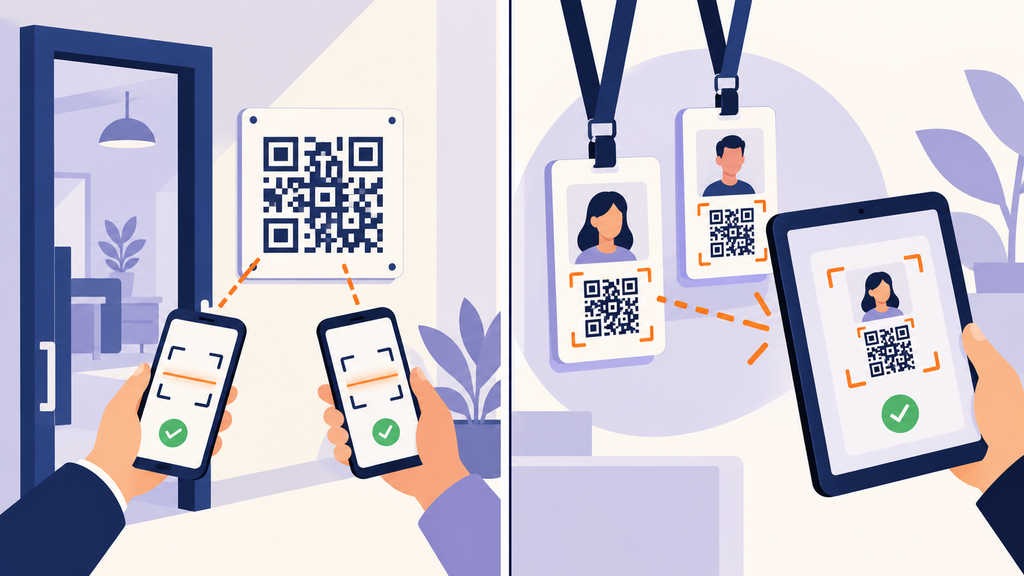
Option 1: Employees Scan the Office Code
One QR code at the entrance. Every employee scans it with their own phone.
Best for: offices, shops, salons, clinics, and coaching centers where everyone has a smartphone.
Option 2: The Supervisor Scans Each Employee’s Code
Each employee gets a personal QR code on an ID card. A supervisor or receptionist scans it using one phone or tablet.
Best for: staff who don’t have smartphones, such as helpers, cleaners, or warehouse workers.
Tip: the supervisor should check the face matches the card, or the app should take a photo at the moment of scanning.
Many small businesses use both. Office staff scan the wall code, and support staff get their cards scanned at the desk.
Why QR Code Attendance Is Great for Small Teams
- Low cost. No biometric machine to buy. Staff use phones they already have.
- Quick to start. Most small teams are up and running within a day or two.
- Touch-free. Nobody shares a scanner or a pen.
- Easy for everyone. Scanning a QR code is something most people already do every day.
- Works across branches. Each location gets its own code, but everything shows on one dashboard.
- Easy to move. Changing offices or opening a new branch? Just print a new code.
- Less sensitive data. No fingerprints or face templates are stored.
What You Need Before You Start
Keep these ready before setting anything up:
- An attendance app or software that supports QR code attendance with location checks
- Smartphones for employees, with camera and location turned on
- A printer for a static code, or a spare phone or tablet with a stand and charger for a dynamic code
- Mobile data or Wi-Fi at the workplace
- Your basic attendance rules: shift timings, grace time, weekly off, half-day rule, and holidays
- A list of employees with names, phone numbers, and shifts
How to Set Up QR Code Attendance in 8 Simple Steps
For a team of 10 to 30 people, this usually takes a few hours spread over a day or two.
Step 1: Pick Your Attendance App
Choose an app that supports QR code attendance, location checks, and leave management and gives you simple monthly reports. Try the free trial first, if available.
Step 2: Add Your Workplace Location
Add your office address in the app and set a small boundary around it, usually 50 to 200 meters. This is called a geo-fence. Scans only count when the phone is inside it.
Step 3: Set Your Attendance Rules
Enter shift timings, grace time, half-day rules, weekly offs, and the year’s holiday list.
Step 4: Add Your Employees
Add each employee with their name, phone number, and shift. Most apps let you upload everyone from one Excel sheet.
Step 5: Create and Place the QR Code
- Static code: print it large, laminate it, and stick it at eye level near the entrance, inside the premises.
- Dynamic code: open the QR screen on a tablet or spare phone, mount it on a stand near the entrance, keep it charging, and turn off auto-lock.
Step 6: Turn On Location and Selfie Checks
Switch on location checking. If your app offers selfie capture, turn it on too. These two settings stop most cheating.
Step 7: Show Your Team How It Works
Spend ten minutes with your team. Help everyone install the app, log in, and do one test scan together. Explain how to apply for leave and what to do if they forget to scan.
Step 8: Run a One-Week Trial, Then Go Live
Keep the register for one week only and compare both records each evening. Fix any small issues, then stop the register on a fixed date. Once your attendance is clean, it can feed straight into salaries. Our guides on payroll and working hours explain how to connect the two.
Where to Place the QR Code
A small detail that makes a big difference:
- Near the main entrance, where everyone passes in and out
- At eye level, about 4 to 5 feet from the floor
- In good light, away from glare and direct sunlight
- Inside the premises, not outside the gate, where it can be scanned from the street
- Out of easy reach for visitors, if you’re using a static code
How to Stop Proxy Attendance
Proxy attendance, also called buddy punching, is when one person marks attendance for another. Here’s how to prevent it:
- Use a dynamic QR code so shared photos stop working.
- Turn on location checks with a tight boundary around your workplace.
- Turn on selfie capture so every scan has a photo of who made it.
- Allow one phone per employee, so nobody can log in for a colleague.
- Look at reports for odd patterns, like two people scanning at the exact same second every day.
- Make the rule clear. Most people stop trying once they know the system can catch it.
QR Code vs. Biometric: Which Is Better for You?
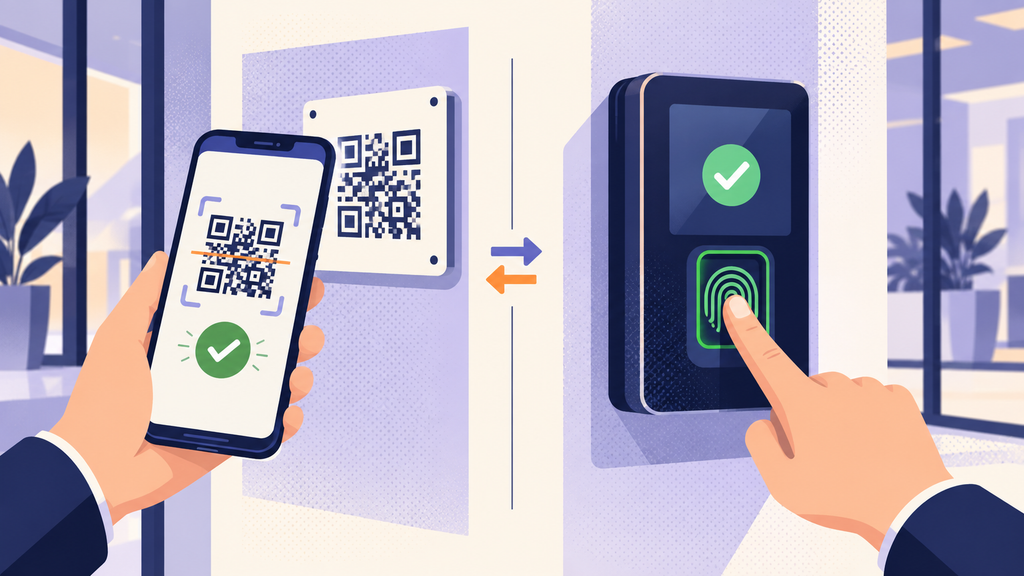
Both have their place.
QR code attendance is cheaper, touch-free, and quick to set up. It’s ideal for small teams, multiple small branches, and staff who already use smartphones.
Biometric attendance checks a fingerprint or face, so it’s harder to cheat. It suits larger teams at one location, factories and businesses where some staff don’t have phones. It costs more and stores more sensitive data. You can compare both in detail in our biometric attendance guides.
For a small team of up to 30 or 40 people, QR code attendance with location and selfie checks usually offers the best balance of cost, ease and reliability.
Common Problems and Quick Fixes
The code won’t scan. Clean the camera lens, step a little closer and make sure the code isn’t faded, wrinkled or under glare.
The app says “outside location” inside the office. Indoor location can be less accurate. Ask the employee to turn on high-accuracy location, or widen the boundary slightly.
No internet at the workplace. Choose an app that saves scans offline and uploads them later.
Someone forgot their phone. Let them raise a missed scan request in the app later, or have the supervisor scan their ID card.
The tablet showing the dynamic code keeps locking. Turn off auto-lock, keep it plugged in and use kiosk mode if the app has it.
Staff worry about being tracked. Explain clearly that location is only checked at the moment of scanning, not all day.
A Quick Note on Privacy
QR code attendance collects less sensitive data than biometrics, but it still records names, phone numbers, location at the time of scanning and sometimes selfies. Under India’s Digital Personal Data Protection (DPDP) Act, 2023, employers can use this data for employment purposes, but must keep it secure, use it only for that purpose and not keep it longer than needed.
Tell your team in writing what the app collects and why, and limit who can see the data. This is general information, not legal advice.
Mistakes to Avoid
- Using a static code with no location check. It’s the easiest setup to cheat.
- Making the location boundary too big. A wide boundary lets people scan from the tea stall down the road.
- Not planning for staff without smartphones. Keep ID card scanning as a backup.
- Skipping the rules setup. Wrong shift times mean wrong reports.
- Keeping the register forever. Run both for one week, then stop the register for good.
- Not explaining the change. People accept new systems much faster when they know why.
Final Thoughts
Go back to the coaching centre from the start. With one QR code at the entrance and an app on each phone, the owner now knows exactly when each person arrived and left, without spending money on a biometric machine. The register is gone, the arguments are gone and month-end takes minutes instead of hours.
That’s the real value of QR code attendance for small teams. It’s simple, affordable and quick to start. Set it up with a dynamic code or a location check, explain it to your team and give it a one-week trial. Most small teams never look back.
Start QR Code Attendance with Attendi
Attendi is a simple attendance management system built for Indian businesses. It supports QR code and biometric attendance, manages leave and holidays, tracks working hours for payroll and gives you clear reports in one place. If you run a small team and want to move away from paper registers, Attendi makes it easy to get started. Explore more guides on our website or get in touch through our contact page.
Frequently Asked Questions
How does QR code attendance work?
Employees scan a QR code at the workplace using an attendance app on their phone. The app saves the time and location and sends it to the attendance software, which marks late arrivals, absences and working hours automatically.
Can employees cheat QR code attendance?
They can with a plain static code, by sharing a photo of it. To prevent this, use a dynamic code that changes every few seconds, or combine a static code with location and selfie checks.
Is QR code attendance good for small businesses?
Yes. It needs no expensive machine, is quick to set up and works well for teams of up to 30 or 40 people, especially when staff already use smartphones.
What if an employee doesn’t have a smartphone?
Give them a personal QR code on an ID card, and let a supervisor or receptionist scan it using an office phone or tablet.
Does QR code attendance work without the internet?
Many apps save scans on the phone and upload them once the internet is back. Check for offline mode before choosing an app.
