Between 9:00 and 9:30 am, the lift lobby of a typical Indian office building gets crowded. People rush in with laptop bags and coffee, someone is on a call, and a short line forms at the attendance machine. One person’s finger doesn’t read on the first try. Another has forgotten their ID card. A third sign is for a colleague who is “just parking the bike.”
Face recognition attendance changes this morning routine. Employees simply look at a screen for a moment and walk on. No touching, no cards, no signing for friends. It’s one of the reasons more and more offices across Indian cities are switching to it.
This guide explains how a face recognition attendance system works in an office, why it suits Indian workplaces, what to plan for, how to protect employee data, and how to roll it out smoothly.
Quick answer: A face recognition attendance system marks attendance by scanning an employee’s face at the office entrance or through a mobile app. It’s touch-free, fast during the morning rush, and very hard to cheat when it has liveness detection. For Indian offices, it works well for single offices, multi-floor buildings, multiple branches, and hybrid teams, as long as you choose a device that handles varied lighting and appearances, works offline during internet cuts, connects to good attendance software, and follows India’s data protection rules.
What Is a Face Recognition Attendance System?
A face recognition attendance system identifies employees by their face and records the exact time they arrive and leave. It usually has three parts:
- A device at the entrance, such as a wall-mounted terminal or a tablet on a stand, with a camera that scans faces.
- A mobile app for employees who work from home, travel, or visit clients, where they check in with a selfie.
- Attendance software that collects every punch, applies your office rules, and creates reports for HR and payroll.
Instead of storing a photo, the system turns key facial features into a coded template and compares new scans against it. You can read more about biometric devices in our biometric attendance guides.
How It Works in an Office
- Registration: each employee stands in front of the device or uses the app once, so the system can learn their face.
- Check-in: every morning, the employee looks at the device for a moment.
- Matching: the system compares the face with stored templates and confirms who it is, usually in about a second.
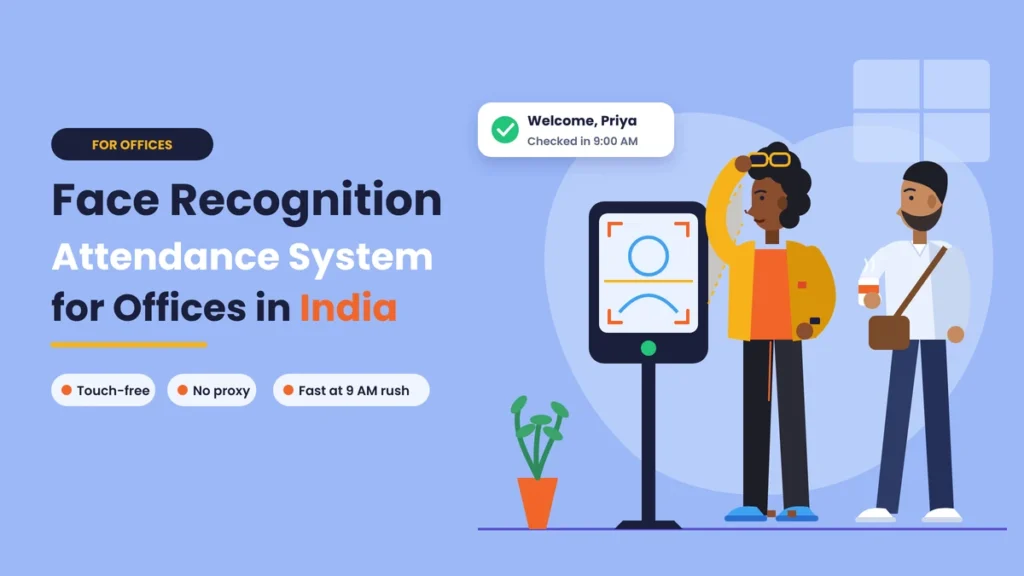
- Recording: the exact time is saved, and the screen shows a message such as “Welcome, Priya, 9:00 AM.”
- Syncing: the punch reaches the cloud software, where late marks, half days, leave, and overtime are calculated automatically.
If the internet is down, a good device stores punches and sends them once the connection returns.
Why Indian Offices Are Moving to Face Recognition
Several things about Indian offices make face recognition a natural fit.
- The morning rush is real. Many offices start at the same time, and teams arrive in waves. Face recognition is quick and doesn’t need people to stop, press, or retry.
- Hygiene matters more than before. After the pandemic, many companies prefer touch-free check-in over shared fingerprint sensors.
- Cards and registers are easy to misuse. ID cards get lent to colleagues, and registers invite proxy entries. A face can’t be handed over.
- Hybrid work is common. Employees split their week between office and home. Face check-in at the office and selfie check-in in the app can feed the same system.
- Companies are growing across cities. A business with offices in Pune, Bengaluru, and Gurugram needs one view of attendance, not three separate registers.
- It feels modern. A smooth, touch-free entry creates a good impression on employees, candidates, and visitors.
Before vs. Now: Office Attendance Before and After Face Recognition
| Area | Before (register, card, or fingerprint) | Now (face recognition) |
|---|---|---|
| Checking in | Sign, swipe, or press a finger. | Look at the screen for a second. |
| Touch needed | Pen, card, or shared sensor | None |
| Proxy attendance | Cards lent, registers signed for others | Very difficult with liveness detection |
| Morning rush | Lines at one register or sensor | Quick movement through the entrance |
| Forgotten ID card | No attendance or manual entry | Not needed |
| Hybrid and remote days | Tracked on email or chat | Selfie check-in in the app |
| Multiple offices | Separate records per location | One dashboard for all branches |
| Late marks and overtime | Counted by HR | Calculated automatically |
| Records for audits | Paper registers and spreadsheets | Complete digital history |
| Employee view | Little or none | Own records in the app |
Benefits of Face Recognition Attendance for Offices

1. Touch-free and hygienic
Nobody touches a shared surface. This matters in flu season, during pollution months when many people wear masks and fall ill more often, and for anyone who simply prefers not to touch a common sensor.
2. Fast check-in at busy times
Recognition takes about a second, and employees barely need to stop. Even when a large team arrives together, the line moves quickly.
3. Ends buddy punching
With liveness detection, the system checks that a real person is present, not a photo or a video on a phone. Proxy attendance becomes very hard.
4. No cards to lose or forget
Employees don’t need to carry anything. That means no replacement cards, no “I left my card at home” entries, and no shared cards.
5. Works for hybrid teams
Office days are marked at the entrance device, and work-from-home or client-visit days can be marked through a selfie check-in in the app, with location if needed. Everything lands in one record.
6. One view across branches
Devices in different cities send data to the same cloud software. HR and managers see every office in one place, with the same rules applied everywhere.
7. Accurate data for payroll
Exact punch times, automatic late marks and overtime, and linked leave mean salary calculations are based on clean data, with far fewer corrections at month end.
8. A better first impression
A smooth, modern entry system tells employees and visitors that the company runs on organized, fair processes.
Indian Office Realities to Plan For
Face recognition works very well in offices, but a few local realities are worth planning for before you buy.
Different appearances
Indian workplaces are wonderfully diverse. Employees may have beards, turbans, hijabs, bindis, glasses, or heavy makeup for an event or a new haircut. Good systems handle these well, especially when you register employees in their usual everyday look. Test the device with a varied group of your own team before you commit.
Masks
During pollution months or illness, many people wear masks. Many newer devices can recognize people with masks, but accuracy can drop. If masks are common in your office, check this specifically, and keep a backup method such as a PIN or app check-in for those days.
Lighting at the entrance
Glass facades, large windows, and bright sunlight behind the person can confuse basic cameras. Choose a device with an infrared camera and place it where the light falls on the employee’s face, not behind them.
Power cuts and internet drops
Choose devices with offline storage, so punches are saved and synced later, and connect them to a small UPS. In buildings with weak Wi-Fi near the entrance, a LAN cable or a 4G connection is more reliable.
Multiple floors and entrances
If people enter from a parking basement, a main lobby, and a side gate, each entrance needs a device, or you need a clear rule about which entrance to use.
Contract staff and visitors
Housekeeping, security, and contract staff often need attendance too. Decide whether they’ll use the same system, and keep visitor management separate from employee attendance.
Setup Options for Your Office
- Wall-mounted face terminal: the most common choice for office entrances. Neat, reliable, and fast.
- Tablet kiosk on a stand: flexible and easy to move, useful for smaller offices or reception desks.
- Mobile app with selfie check-in: for hybrid, remote, and field staff, ideally with liveness detection and location.
- A mix of the above: terminals at each office plus the app for people on the move, all feeding one system.
Whichever you choose, the software behind it should handle office timings, grace time, shifts, half days, overtime, leave, and holidays. Our attendance management guides explain how to set up these rules, and our leave and holiday management section covers linking leave and holidays to attendance.
Employee Data and India’s Data Protection Law
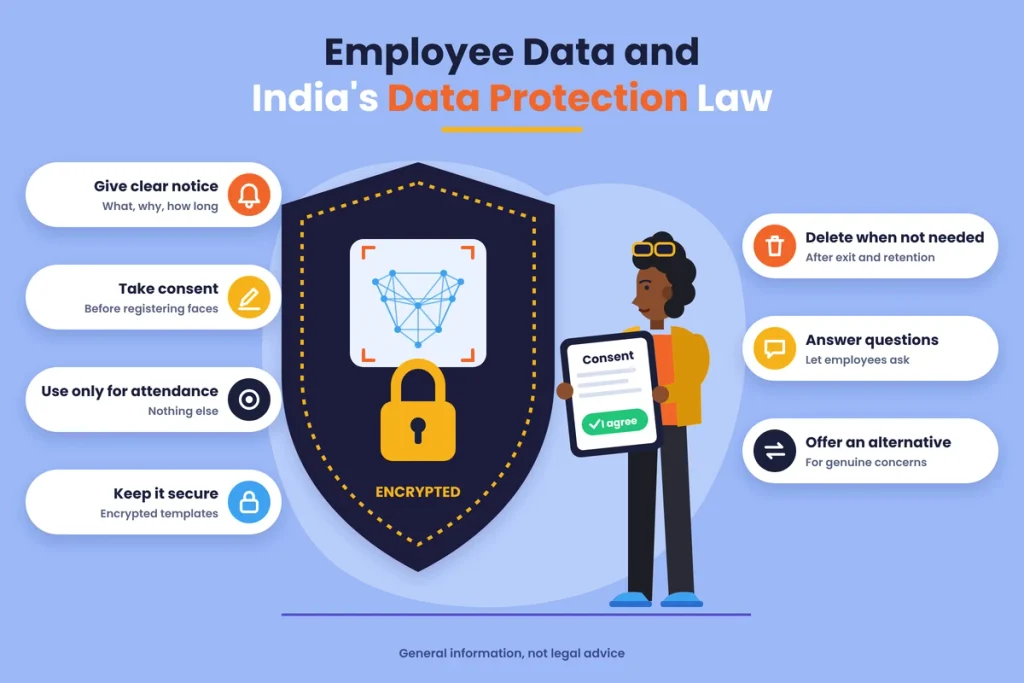
A face template is personal data. India’s Digital Personal Data Protection Act, 2023, sets out how businesses should collect and use personal data, and its rules are being brought into force in stages. In simple terms, good practice for an office looks like this:
- Give clear notice: tell employees what data you collect, why, where it’s stored, and for how long.
- Take consent: get clear written or digital consent before registering faces.
- Use it only for attendance: don’t use face data for anything else.
- Keep it secure: choose systems that store templates in encrypted form, limit who can access them, and keep access logs.
- Delete it when it’s no longer needed: for example, after an employee leaves and your record-keeping period ends.
- Respond to questions: let employees ask about their data and correct or remove it where appropriate.
- Offer an alternative: for anyone with a genuine concern, provide another way to mark attendance.
How to Roll It Out in Your Office
- Set your attendance rules: office timings, grace time, half day, late marks, and overtime.
- Choose devices and app: based on entrances, team size, lighting, and hybrid needs.
- Plan placement: at each entrance, at a comfortable height, with good front lighting and power backup.
- Inform employees and take consent: explain why you’re doing it and how data is protected.
- Register everyone: in their normal everyday appearance, in good light.
- Run a short trial: use it alongside the old method for a week and fix any issues.
- Switch over fully: retire the register or card system so there’s only one record.
- Review regularly: check reports, missed punches and correction requests every day for the first few weeks.
Questions to Ask Your Vendor
Before you sign, ask these questions and note the answers:
- Does the device have an infrared camera and liveness detection?
- How does it perform with strong light behind the person, and in a dim lobby?
- Can it recognise employees wearing masks, glasses or head coverings?
- How many faces and punches can it store, and does it work offline?
- Does it connect over Wi-Fi, LAN and 4G?
- Which attendance software does it work with, and how quickly do punches appear?
- Is there a mobile app for hybrid and remote check-in?
- How are face templates stored, encrypted and deleted?
- What warranty and on-site service do you offer in our city?
- Can we run a trial with our own employees before buying?
Clear, confident answers are a good sign. Vague answers about software, data storage or support are a reason to keep looking.
Common Mistakes Offices Make
- Buying a device without liveness detection, which lets photos and videos through.
- Placing it facing a bright window, which causes failed scans every morning.
- Skipping the trial, so problems appear on the first busy Monday.
- Ignoring hybrid and remote days, leaving gaps in attendance records.
- Not explaining the change, which makes employees uneasy about cameras.
- Running old and new systems side by side for months, creating confusion about which record is correct.
- Treating data protection as an afterthought, instead of planning consent and security from day one.
What Does It Cost?
Costs depend on the number of entrances, the device model and the software plan. In general, you’ll pay for:
- Face recognition devices for each entrance.
- Installation and setup.
- A software subscription, often based on the number of employees.
- Optional items such as a UPS, a stand or extended warranty.
Compare the total cost over two or three years, not just the device price. Savings in HR time, fewer payroll errors and the end of proxy attendance usually make the investment worthwhile for offices of most sizes.
Final Thoughts
The morning rush at an Indian office says a lot about how attendance is managed. Lines at a register, forgotten cards and quiet favours between colleagues all point to a system that’s slow and easy to bend. Face recognition replaces all of that with a moment in front of a screen.
It’s touch-free, quick, fair and hard to cheat, and it works across floors, branches and hybrid schedules when paired with good software and a mobile app. Plan for local realities like lighting, masks, power cuts and diverse appearances, take employee consent seriously and roll it out step by step. Done well, your 9 am rush becomes a smooth walk-in, and your month end becomes a quick review instead of a long argument.
Face Recognition Attendance with Attendi
Attendi is an attendance management platform built for Indian businesses, with face recognition, QR code attendance and field attendance in one place. Check-ins sync in real time to a central dashboard, so HR can see every office and every team at a glance. Working hours, late marks, leave and overtime are calculated automatically and flow into payroll, while employees can see their own records from their phone. If you’re planning face recognition attendance for your office, explore Attendi and see how it fits your team.
Frequently Asked Questions
What is a face recognition attendance system?
It’s a system that marks attendance by scanning an employee’s face at a device or through a mobile app, records the exact time and sends the data to attendance software for reports and payroll.
Is face recognition attendance good for offices in India?
Yes. It’s touch-free, fast during the morning rush, stops proxy attendance and works for multiple branches and hybrid teams. Choose a device that handles varied lighting and appearances and works offline.
Does face recognition attendance work with masks, glasses or beards?
Glasses and beards are usually fine. Many newer devices can recognise people wearing masks, though accuracy may drop. Test the device with your own team and keep a backup method for mask-heavy days.
Can face recognition attendance be used for work-from-home employees?
Yes. Employees can check in through a mobile app with a selfie, ideally with liveness detection and location, and the record joins the same system as office check-ins.
Is face recognition attendance legal in India?
Businesses can use it, but face data is personal data under India’s data protection law. Give employees clear notice, take consent, use the data only for attendance and keep it secure.
What happens if the internet goes down?
Good face recognition devices store punches offline and send them to the software automatically once the internet is back.
How long does it take to set up face recognition attendance in an office?
A small office can usually be set up in a few days, including device installation, employee registration and a short trial. Larger or multi-branch setups take a little longer.